Description
Plug in the driver. Skip the wiring mess.
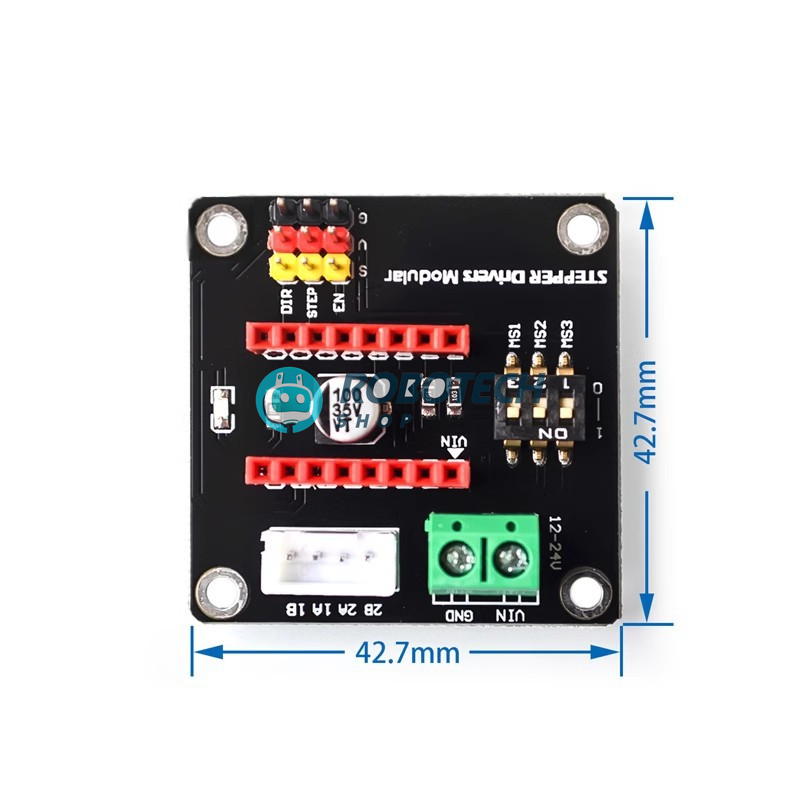
This expansion board gives your A4988 or DRV8825 stepper driver a proper home: power terminal, motor connector, control pins and a 3-way DIP switch for microstepping. Slot in the driver, connect your Arduino and motor, and you are running.
Set the microstepping with one switch
Slide the three DIP switches to choose how finely each step is divided. Choose a mode to see the switch positions and steps per turn for a standard 1.8° NEMA 17 motor.
Settings shown are for the A4988. The DRV8825 uses a slightly different table for its finest modes.
Specifications
| Model | Stepper driver expansion board (42 type) |
|---|---|
| Compatible drivers | A4988 and DRV8825 modules (driver sold separately) |
| Power input | 12V to 24V DC through a green screw terminal (VIN and GND) |
| Logic level | 5V |
| Control pins | DIR, STEP and EN |
| Microstepping | On-board 3-way DIP switch (MS1, MS2, MS3) |
| Motor connector | 4-pin connector, labelled 2B, 2A, 1A, 1B |
| Power filtering | On-board 100 µF 35V capacitor |
| Size | About 42.7 × 42.7 mm |
| Mounting | 4 holes of 3 mm, 35.56 × 35.56 mm apart |
| In the box | 1 × expansion board (A4988 or DRV8825 driver sold separately) |
What you can build
One board per motor. Use as many as you need.
3D printer or CNC axis
Add a clean, plug-in driver for an extra axis or a replacement stepper on a 3D printer or small CNC build.
Arduino stepper experiments
Learn stepper control without a breadboard full of wires.
Camera slider
Smooth, repeatable time-lapse moves.
Robot arm joint
Precise angles from a NEMA 17 motor.
Automatic curtain or feeder
Open, close and dispense on a schedule.
Lab and classroom kits
A tidy, repeatable setup for student projects.
Wiring it to Arduino UNO
| Board | Connect to |
|---|---|
| DIR | Arduino pin D2 |
| STEP | Arduino pin D3 |
| EN | Arduino pin D8 |
| 5V and GND of the control header | Arduino 5V and GND |
| VIN and GND (green terminal) | 12V to 24V power supply. Join its GND to the Arduino GND. |
| 2B, 2A, 1A, 1B | Stepper motor coils. One coil on 1A and 1B, the other on 2A and 2B. |
Check before you power on: install the driver module the right way round, with its pin labels matching the labels on the board. A driver plugged in backwards can burn. Connect the motor first, and never unplug it while the board is powered.
Basic Arduino code
This sketch turns the motor one full revolution one way, waits, then turns it back. It assumes a 1.8° motor (200 steps per turn) with all three DIP switches off.
const int stepPin = 3;
const int dirPin = 2;
const int enPin = 8;
void setup() {
  pinMode(stepPin, OUTPUT);
  pinMode(dirPin, OUTPUT);
  pinMode(enPin, OUTPUT);
  digitalWrite(enPin, LOW);   // LOW = driver on
}
void loop() {
  digitalWrite(dirPin, HIGH);
  for (int i = 0; i < 200; i++) {
    digitalWrite(stepPin, HIGH);
    delayMicroseconds(1000);
    digitalWrite(stepPin, LOW);
    delayMicroseconds(1000);
  }
  delay(1000);
  digitalWrite(dirPin, LOW);
  for (int i = 0; i < 200; i++) {
    digitalWrite(stepPin, HIGH);
    delayMicroseconds(1000);
    digitalWrite(stepPin, LOW);
    delayMicroseconds(1000);
  }
  delay(1000);
}
To spin faster, reduce the 1000 microsecond delays. With all three switches on (1/16 step on the A4988), use 3200 steps per turn instead of 200.
Set the motor current first
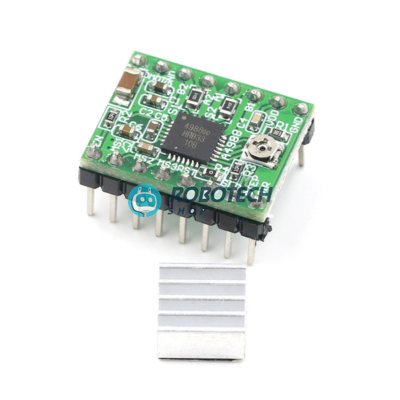
Before running a motor, adjust the small trimmer on your A4988 or DRV8825 module so the current limit matches your motor. Use the heatsink, and see our A4988 or DRV8825 product page for the exact setting.
Questions buyers ask
Is the A4988 or DRV8825 driver included?
No. This listing is for the expansion board only. Add an A4988 or DRV8825 driver module to your order.
Which Arduino boards does it work with?
Any board that can send STEP and DIR signals at 5V, such as Arduino UNO, Nano and Mega.
What power supply do I need?
A 12V to 24V DC supply, with at least 2A for one NEMA 17 motor. Use the green VIN and GND terminal. The Arduino ground and the supply ground must be joined.
How do I set the microstepping on a DRV8825?
MS1, MS2 and MS3 map to the DRV8825’s M0, M1 and M2. All off is full step, MS1 on is 1/2, MS2 on is 1/4, MS1 and MS2 on is 1/8, MS3 on alone is 1/16, and any other combination with MS3 on gives 1/32.
My driver got hot or burned. Why?
The most common causes are installing the driver backwards, unplugging the motor while powered, or setting the current too high. Check the orientation first.
The motor does not move. What should I check?
Check the motor coil pairs (use a multimeter to find them), that the EN pin is low, that RESET and SLEEP on the driver are connected, and that the current limit is not set too low.
Do you deliver outside Dhaka?
Yes
Related searches
English: stepper motor driver expansion board price in Bangladesh, A4988 expansion board BD, DRV8825 expansion board Bangladesh, 42 stepper motor driver board Dhaka, stepper driver shield Arduino BD, A4988 driver holder board, 3D printer driver board Bangladesh, CNC stepper driver module BD, robotics shop Bangladesh, electronics shop Dhaka
Banglish: stepper driver expansion board dam koto, A4988 expansion board kothay pabo, DRV8825 driver board price BD, 3D printer stepper board kinbo kothay, Arduino shop Dhaka
বাংলা: স্টেপার মোটর ড্রাইভার এক্সপানশন বোর্ড দাম, A4988 এক্সপানশন বোর্ড, ৩ডি প্রিন্টার স্টেপার ড্রাইভার বোর্ড, আরডুইনো স্টেপার শিল্ড, রোবোটিক্স শপ ঢাকা