
Description
One meter for every electronics and electrical check.
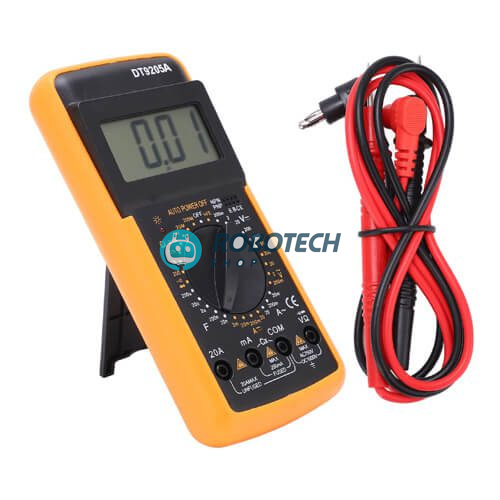
The DT9205A digital multimeter measures AC and DC voltage, current, resistance and capacitance. It also tests diodes, continuity and transistors. A big LCD, a rotary dial and a fold-out stand make it easy to use on the bench, and the 9V battery is already included.
DT9205A ডিজিটাল মাল্টিমিটার দিয়ে AC/DC ভোল্টেজ, কারেন্ট, রেজিস্ট্যান্স, ক্যাপাসিট্যান্স, ডায়োড, কন্টিনিউইটি এবং ট্রানজিস্টর hFE মাপা যায়। ৯ ভোল্ট ব্যাটারি সহ। ইলেকট্রনিক্স প্রজেক্ট, মেরামত, স্কুল-কলেজ ল্যাব এবং বৈদ্যুতিক কাজে খুবই উপযোগী।
What do you want to measure?
Choose a job to see the dial setting and how to connect the test leads.
General guide. Always read the markings on the meter and keep the leads in the correct sockets.
Specifications
| Model | DT9205A digital multimeter |
|---|---|
| Display | 3½ digit LCD, maximum reading 1999 |
| DC voltage | Up to 1000V, with ranges from 200 mV |
| AC voltage | Up to 750V |
| Current | AC and DC, with mA ranges and a 20A range |
| Resistance | 200 Ω up to 200 MΩ |
| Capacitance | nF to µF ranges |
| Other tests | Diode test, audible continuity buzzer and transistor hFE test (NPN and PNP) |
| Range selection | Rotary dial, manual ranging |
| Auto power off | Turns itself off after about 15 minutes to save the battery |
| Safety | Overload protection, a fused mA input (200 mA) and low-battery indication |
| Power | 9V battery (included) |
| Stand | Fold-out back stand for easy reading on the bench |
| Size | About 190 × 90 × 35 mm |
| In the box | 1 × DT9205A multimeter, 1 × pair of red and black test leads, 1 × 9V battery |
What you can use it for
Wherever there is a circuit, there is something to measure.
Arduino and electronics projects
Check 5V and 3.3V rails, find broken wires and bad joints, and test resistors, diodes and transistors before you build.
Battery and solar checks
Measure battery voltage and the DC voltage of a solar panel, within the meter’s limits.
Electronics repair
Check fuses, switches, chargers and adapters.
Home and car checks
Test plugs, cables, sockets and a 12V car battery.
School and college labs
A reliable, easy meter for practicals and projects.
Component sorting
Identify unknown resistors, capacitors and transistors.
Your first measurement in four steps
- Plug in. Black lead into COM, red lead into VΩ for voltage and resistance.
- Choose. Turn the dial to the function and a range higher than the value you expect.
- Touch. Place the probe tips on the two points you want to measure.
- Read. Look at the LCD. If it shows a 1 on the left, the value is above the range, so turn the dial up. Turn the dial to OFF when you finish.
Safety first: never connect the meter across a power source while it is set to measure current, because this can blow the fuse or damage the meter. Use the 20A input only for short checks. Take the leads out of the circuit before you turn the dial, and be very careful with mains voltage. If you are not trained, ask an electrician.
Questions buyers ask
Is the battery included?
Yes. A 9V battery is included, so you can start using the meter as soon as it arrives.
Can it measure AC and DC?
Yes. It measures both AC and DC voltage (up to 750V AC and 1000V DC) and AC and DC current (up to 20A).
Is it auto-ranging?
No. You select the range with the dial. If the screen shows a 1 on the left side, turn the dial to a higher range.
Can I test Arduino parts with it?
Yes. Use it to check voltages, wires, resistors, LEDs, diodes and transistors, and to confirm that your power supply is correct.
How accurate is the capacitance test?
It is good for quick checks and for sorting parts. For precise values, use a dedicated LCR meter.
How do I replace the battery?
Turn the dial to OFF, remove the test leads, open the battery cover on the back, and replace the 9V battery with the correct polarity.
Do you deliver outside Dhaka?
Yes, we deliver all over Bangladesh.
Related searches
English: DT9205A multimeter price in Bangladesh, digital multimeter BD, multimeter Dhaka, DT-9205A price, AC DC multimeter Bangladesh, multimeter with capacitance and transistor tester, multimeter for students, Arduino multimeter, electronics tools shop Dhaka, robotics shop Bangladesh
Banglish: multimeter dam koto, digital multimeter kothay pabo, DT9205A price BD, multimeter kinbo kothay Dhaka, electronics tools Dhaka
বাংলা: ডিজিটাল মাল্টিমিটার দাম, মাল্টিমিটার কোথায় পাবো, ডিটি৯২০৫এ মাল্টিমিটার, ইলেকট্রনিক্স টুলস ঢাকা, রোবোটিক্স শপ বাংলাদেশ


Reviews
There are no reviews yet.