
Description
Give your project a sense for magnets.
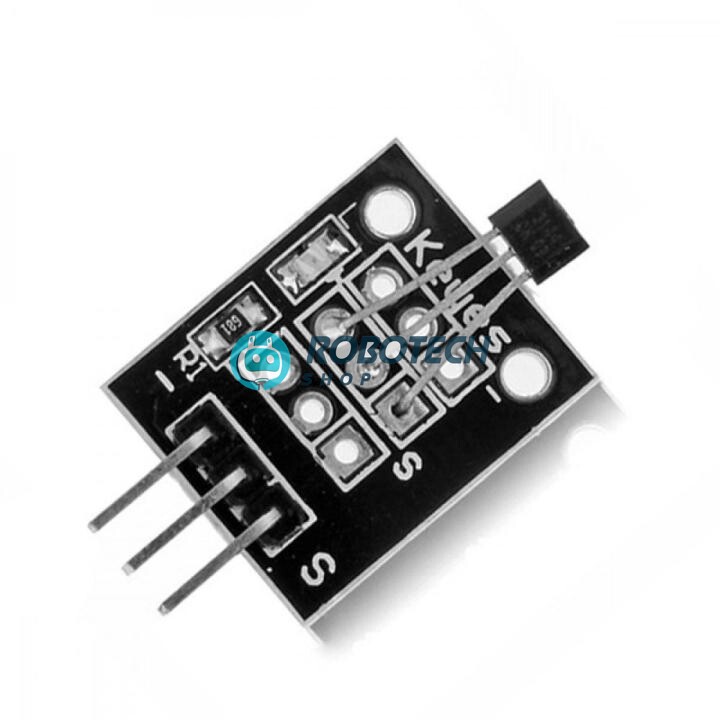
The A3144E Hall effect sensor module detects a magnet without touching it. It gives one clean digital signal: LOW when a magnet is near and HIGH when it is not. Count wheel turns, measure RPM, sense doors and lids, or stop a moving part at the right spot.
A3144E Hall effect সেন্সর মডিউল চুম্বক (magnet) সনাক্ত করে, কোনো স্পর্শ ছাড়াই। এর একটি মাত্র ডিজিটাল আউটপুট পিন (S) আছে: চুম্বক কাছে এলে LOW, দূরে থাকলে HIGH। হুইলের ঘূর্ণন গোনা, RPM মাপা, দরজা বা ঢাকনা খোলা-বন্ধ বোঝা এবং Arduino প্রজেক্টে খুবই উপযোগী।
See how it reacts to a magnet
Choose what the magnet is doing to see what the signal pin tells your board.
Typical behaviour on a 5V supply with a small, strong magnet.
Specifications
| Product | A3144E Hall effect magnetic sensor module |
|---|---|
| Sensor | A3144E digital Hall effect switch |
| Output | Digital on the S pin: LOW when a magnet is detected, HIGH when not. One signal pin only, with no analog pin and no potentiometer. |
| Pins | 3-pin 2.54 mm header: − (GND), middle (+5V) and S (signal) |
| Supply | 5V recommended. See the 3.3V note below for ESP32. |
| Detects | Magnets only. It does not sense plain metal. |
| Indicator | On-board LED and resistor |
| Mounting | 2 mounting holes |
| In the box | 1 × A3144E Hall effect sensor module (magnet sold separately) |
What you can build
Anything that moves, turns or opens can carry a magnet.
RPM and speed meter
Glue a small magnet on a wheel or shaft and count the pulses to measure speed.
Door and lid sensor
Know when a door, window or box is open.
Bicycle speedometer
Count wheel turns and show speed on a display.
Robot wheel counter
Measure how far your robot has travelled.
Limit switch without contact
Stop a motor when a moving part reaches the magnet.
Teaching magnetism
Show students how a magnet switches a sensor on and off.
Wiring it to Arduino
| Module pin | Connect to |
|---|---|
| − (minus) | Arduino GND |
| Middle (+) | Arduino 5V |
| S (signal) | Arduino digital pin D2 |
3.3V boards: on an ESP32 or Raspberry Pi, power the module from 3.3V so the signal never goes above 3.3V. Test your module first, because the A3144E works best at about 4.5V or higher. Do not feed a 5V signal into a 3.3V pin.
Basic Arduino code: detect a magnet
const int hallPin = 2;
const int ledPin = 13;
void setup() {
  pinMode(hallPin, INPUT_PULLUP);
  pinMode(ledPin, OUTPUT);
  Serial.begin(9600);
}
void loop() {
  if (digitalRead(hallPin) == LOW) {   // magnet detected
    digitalWrite(ledPin, HIGH);
    Serial.println("Magnet detected");
  } else {
    digitalWrite(ledPin, LOW);
  }
  delay(100);
}
Basic Arduino code: RPM counter
Fix one magnet to a rotating wheel or shaft. The sketch counts pulses for one second and prints the speed in turns per minute.
volatile unsigned long pulses = 0;
void countPulse() {
  pulses++;
}
void setup() {
  pinMode(2, INPUT_PULLUP);
  attachInterrupt(digitalPinToInterrupt(2), countPulse, FALLING);
  Serial.begin(9600);
}
void loop() {
  delay(1000);
  noInterrupts();
  unsigned long p = pulses;
  pulses = 0;
  interrupts();
  Serial.print("RPM: ");
  Serial.println(p * 60);   // one magnet = one pulse per turn
}
Questions buyers ask
What does the sensor output?
One digital signal on the S pin. It reads LOW when a magnet is near and HIGH when the magnet is away.
Does it work with Arduino, ESP32 and Raspberry Pi?
Yes. It has three pins and works with all of them. Use 5V with Arduino. On 3.3V boards, power the module from 3.3V and test it before you build.
Do I need a magnet?
Yes. The sensor reacts only to magnets, and a magnet is sold separately. A small neodymium magnet works well and is easy to glue on a wheel or door.
Why does my sensor not react to the magnet?
The A3144E responds to one pole of the magnet, facing the marked side of the sensor. Turn the magnet around, bring it closer, and check that the wires are on the correct pins.
How close must the magnet be?
It depends on the magnet. A small, strong magnet works from a few millimetres up to a few centimetres. Test your own magnet.
Can it detect iron or steel?
No. It senses magnetic fields, so you need a magnet on the part you want to detect.
Do you deliver outside Dhaka?
Yes, we deliver all over Bangladesh.
Related searches
English: A3144E Hall sensor price in Bangladesh, Hall effect sensor module BD, digital Hall sensor Bangladesh, KY-003 Hall sensor BD, magnetic sensor module Dhaka, Arduino RPM sensor, magnet sensor Bangladesh, Hall sensor for speed measurement, door sensor DIY, ESP32 Hall sensor, robotics shop Bangladesh
Banglish: hall sensor dam koto, magnetic sensor kothay pabo, A3144E hall sensor price BD, RPM sensor kinbo kothay, Arduino shop Dhaka
বাংলা: হল ইফেক্ট সেন্সর দাম, ম্যাগনেটিক সেন্সর মডিউল, আরডুইনো আরপিএম সেন্সর, চুম্বক সেন্সর বাংলাদেশ, রোবোটিক্স শপ ঢাকা


