Description
Record your voice. Play it back with one button.
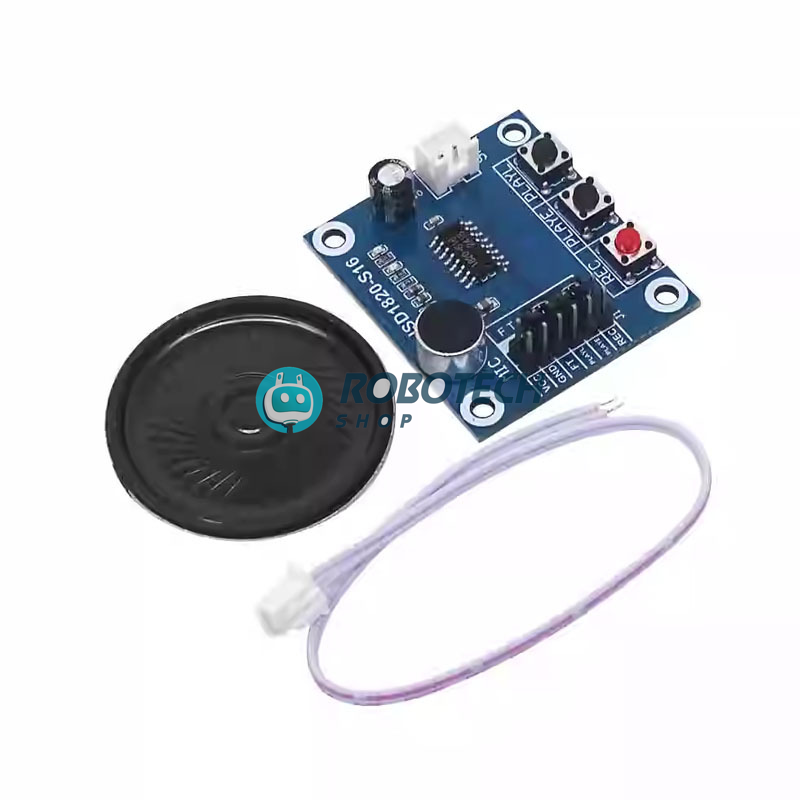
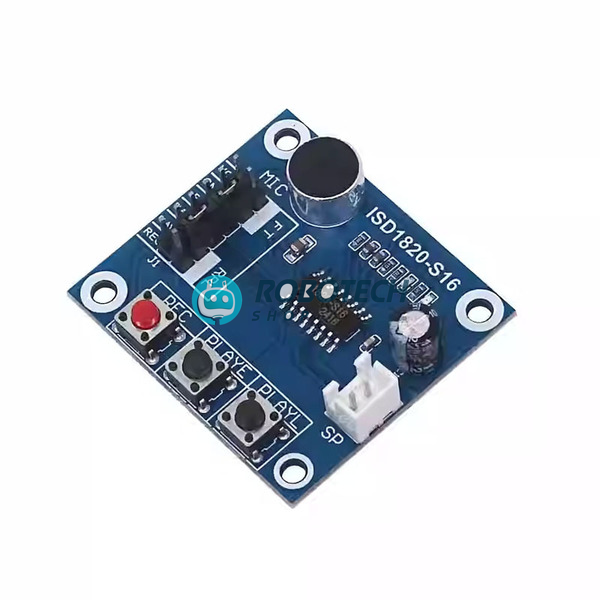
The ISD1820 voice module records and plays back a short message of up to about 10 seconds. It has an onboard microphone, three push buttons and a 0.5W speaker, so it works the moment you power it. The message stays saved even when power is off. You can use it on its own or trigger it from an Arduino or any microcontroller.
ISD1820 ভয়েস মডিউল দিয়ে প্রায় ১০ সেকেন্ড পর্যন্ত নিজের কণ্ঠস্বর রেকর্ড করা এবং বাটন চাপলেই প্লে করা যায়। বোর্ডে মাইক্রোফোন, তিনটি বাটন এবং ০.৫ ওয়াটের স্পিকার আছে, তাই পাওয়ার দিলেই ব্যবহার করা যায়। রেকর্ড করা মেসেজ পাওয়ার বন্ধ করলেও মুছে যায় না। আলাদা কোড ছাড়াই চলে, আবার চাইলে Arduino দিয়েও কন্ট্রোল করা যায়। ডোর অ্যালার্ট, টয়, গিফট কার্ড ও ভয়েস প্রজেক্টের জন্য খুবই উপযোগী।
What will you use it for?
Pick a use to see how this module fits it.
General guide. Check the pin labels printed on your own module.
Specifications
| Product | ISD1820 voice recording and playback module |
|---|---|
| Chip | ISD1820 single-chip voice recorder |
| Recording length | About 10 seconds per message (typical for this module) |
| Memory | Non-volatile, so the message stays after power off |
| Supply voltage | 3 V to 5 V (typical) |
| Speaker | 0.5 W, 8 ohm, with connector wire |
| Microphone | Onboard electret microphone |
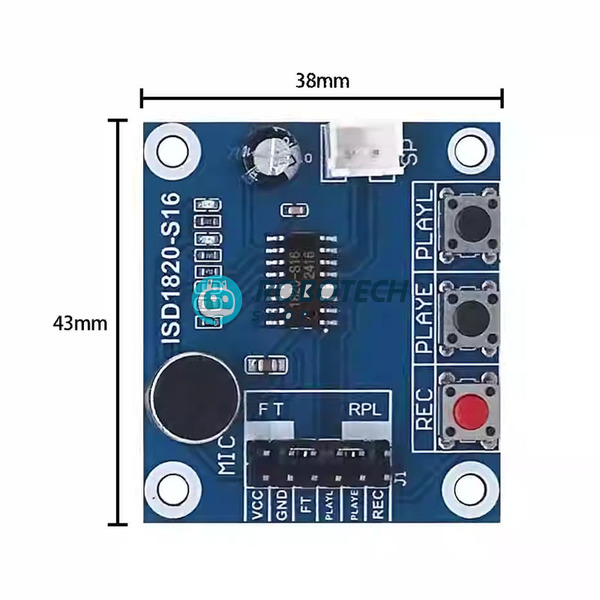
| Controls | REC, PLAYE and PLAYL push buttons |
| Control pins | VCC, GND, REC, PLAYE, PLAYL, FT, RP (check the silkscreen on your board) |
| Playback modes | Edge trigger (PLAYE), level trigger (PLAYL) and repeat (RP jumper) |
| In the box | 1 × ISD1820 module and 1 × 0.5W speaker with wire, as shown |
What you can build
Give your project a voice.
Talking door alert
Play a welcome or warning message when a sensor is triggered.
Greeting cards
Record a personal message for a gift.
Talking toys
Make a toy, doll or robot say your own line.
Voice reminders
Play a spoken reminder at the push of a button.
School projects
Add sound to models and science exhibits.
Arduino sound effects
Trigger short messages from your code.
Use it in four steps
- Connect the speaker. Plug the speaker wire into the speaker connector on the board.
- Power it. Connect VCC and GND to a 3 V to 5 V supply.
- Record. Press and hold the REC button, speak close to the microphone, then release. The LED lights while recording.
- Play. Press PLAYE to play the message once, or hold PLAYL to play while pressed.
// Arduino: record 5 seconds, then play it back
const int REC = 7;
const int PLAYE = 8;

void setup() {
  pinMode(REC, OUTPUT);
  pinMode(PLAYE, OUTPUT);
  digitalWrite(REC, LOW);
  digitalWrite(PLAYE, LOW);
}

void loop() {
  digitalWrite(REC, HIGH);    // start recording
  delay(5000);
  digitalWrite(REC, LOW);     // stop recording
  delay(500);
  digitalWrite(PLAYE, HIGH);  // trigger playback
  delay(100);
  digitalWrite(PLAYE, LOW);
  delay(8000);
}
Before you use it: a new recording replaces the old one, because the module holds one message. Keep messages under about 10 seconds. The speaker is small, so sound is clear but not very loud. Do not connect a larger speaker directly to the module. Always check the pin labels on your own board before wiring.
Questions buyers ask
How long can it record?
About 10 seconds. The module holds one message at a time.
Will the message be lost when I turn it off?
No. The memory is non-volatile, so your recording stays saved without power.
Do I need Arduino or coding?
No. The buttons on the board let you record and play with no code. You can use Arduino when you want automatic control.
Is the speaker included?
Yes. A 0.5W speaker with a connector wire comes with the module.
What is the difference between PLAYE and PLAYL?
PLAYE plays the whole message once with a short press. PLAYL plays only while you hold it.
Can I record music?
It is made for short voice messages. Sound quality is basic, so it is not meant for music.
Do you deliver outside Dhaka?
Yes, we deliver all over Bangladesh.
Related searches
English: ISD1820 voice module price in Bangladesh, ISD1820 recording module BD, voice record and playback module Dhaka, ISD1820 Arduino, voice recorder module with speaker, talking module for project, Arduino shop Bangladesh, electronics shop Bangladesh
Banglish: ISD1820 module dam koto, ISD1820 kothay pabo, voice record module price BD, voice module kinbo kothay, electronics shop Dhaka
বাংলা: ISD1820 ভয়েস মডিউল দাম, ভয়েস রেকর্ডিং মডিউল বাংলাদেশ, ISD1820 রেকর্ড ও প্লেব্যাক মডিউল, আরডুইনো ভয়েস মডিউল, ইলেকট্রনিক্স শপ ঢাকা