Description
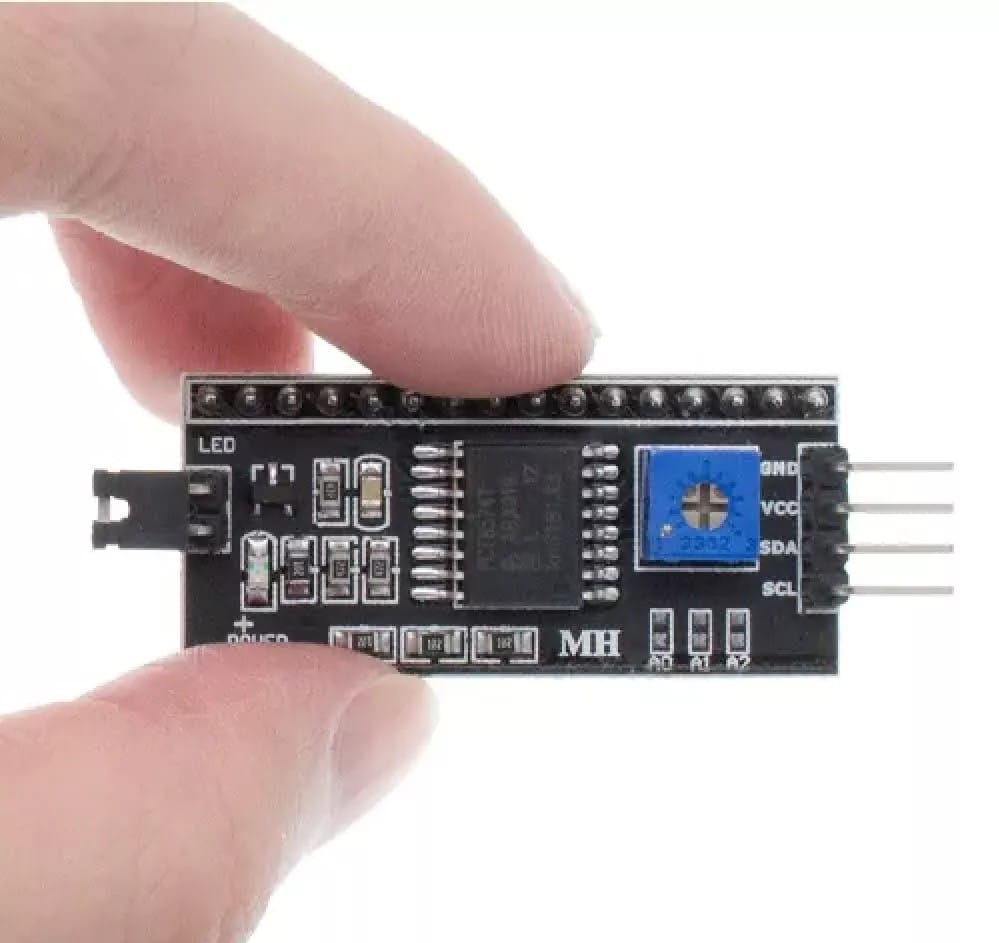
Simplify your LCD connections with this I2C Interface Module, designed to control 1602 or 2004 character LCDs using only two data pins (SDA & SCL) via the I2C protocol. Built around the PCF8574 I/O expander chip, this module significantly reduces the number of Arduino GPIO pins required—perfect for compact or pin-limited projects.
With onboard features like power LED, adjustable contrast potentiometer, and a jumper for LCD backlight control, this board makes LCD integration seamless. Whether you’re building a DIY Arduino project, IoT display, or data logger, this module is a must-have for clean wiring and efficient interfacing.
Key Features:
I2C Control for LCDs – Use only 2 pins (SDA/SCL) instead of 16!
Compatible with 1602 & 2004 LCD modules
Jumper-controlled Backlight – Enable/disable LCD light via jumper cap
Adjustable Contrast – Onboard potentiometer for fine-tuning text clarity
⚡ Operating Voltage: 5V DC
Selectable I2C Address – Default address:
0x27, adjustable via solder pads✅ Built-in PCF8574 Chip – Reliable I/O expansion over I2C
Power LED Indicator – Confirms power status at a glance
Technical Specifications:
| Parameter | Value |
|---|---|
| Chipset | PCF8574 (I2C I/O expander) |
| Voltage | 5V DC |
| Communication Protocol | I2C |
| Default I2C Address | 0x27 (changeable via jumpers) |
| Backlight Control | Jumper-enabled |
| Contrast Control | Built-in potentiometer |
| Compatibility | 1602 (16×2) and 2004 (20×4) LCDs |
| Mounting | LCD pin header (soldered or male pins) |
Package Includes:
✅ 1 × I2C Interface Module for LCD1602/2004
(Optional: Add your own LCD module separately)
⚙️ Applications:
Arduino UNO/Nano/ESP32 LCD display projects
Home automation dashboards
Sensor and data monitoring systems
IoT devices with compact wiring needs
Educational STEM kits and LCD tutorials
❓ Frequently Asked Questions (FAQ):
Q1: What is the benefit of using this I2C module with LCDs?
✅ It reduces LCD pin usage from 16 to just 2 (SDA and SCL), freeing up I/O pins.
Q2: What LCDs are supported?
Compatible with 1602 (16×2) and 2004 (20×4) character LCD displays.
Q3: How can I change the I2C address?
Use the onboard solder pads or jumpers to change the address. Default is 0x27.
Q4: Does it support both 3.3V and 5V logic?
⚠️ It operates at 5V only. Use a logic level shifter if connecting to 3.3V systems (e.g., ESP8266).
Q5: Is it compatible with Arduino IDE libraries?
✅ Yes. Works with LiquidCrystal_I2C and Wire libraries.
SEO Meta Title:
Buy I2C LCD Interface Module – PCF8574 for 1602/2004 Display | Arduino-Compatible
SEO Meta Description:
I2C Interface Module for 1602/2004 LCDs – reduce wiring with PCF8574 I2C chip. Adjustable contrast, backlight jumper, Arduino-compatible. Buy now at RobotechShop.com.
Test Code for Arduino for this I2C Module
#include <Wire.h>
#include <hd44780.h> // main hd44780 header
#include <hd44780ioClass/hd44780_I2Cexp.h> // i2c expander i/o class header
hd44780_I2Cexp lcd; // declare lcd object: auto locate & auto config expander chip
//Pins for the LCD are SCL A5, SDA A4
#include <Wire.h>
void setup()
{
lcd.begin(16, 2);

lcd.clear();
lcd.setCursor(0, 0);
lcd.print(F("Test by"));
lcd.setCursor(0, 1);
lcd.print(F("Robotech Shop"));
delay(2000);
}
void loop()
{
}