


Description
Key Parameters
| LCD Type | TFT |
|---|---|
| LCD Interface | SPI |
| Touch Screen Type | Resistive |
| Touch Screen Controller | XPT2046 |
| Colors | 65536 |
| Backlight | LED |
| Resolution | 320*240 (Pixel) |
| Aspect Ratio | 4:3 |
| Power Consumption | TBD |
| Backlight Current | TBD |
| Operating Temp. (℃) | TBD |
Interface
| PIN NO. | SYMBOL | DESCRIPTION |
|---|---|---|
| 1, 17 | 3.3V | Power positive (3.3V power input) |
| 2, 4 | 5V | Power positive (5V power input) |
| 3, 5, 7, 8, 10, 22 | NC | NC |
| 6, 9, 14, 20, 25 | GND | Ground |
| 11 | TP_IRQ | Touch Panel interrupt, low level while the Touch Panel detects touching |
| 12 | KEY1 | Key |
| 13 | RST | Reset |
| 15 | LCD_RS | LCD instruction control, Instruction/Data Register selection |
| 16 | KEY2 | Key |
| 18 | KEY3 | Key |
| 19 | LCD_SI / TP_SI | SPI data input of LCD/Touch Panel |
| 21 | TP_SO | SPI data output of Touch Panel |
| 23 | LCD_SCK / TP_SCK | SPI clock of LCD/Touch Panel |
| 24 | LCD_CS | LCD chip selection, low active |
| 26 | TP_CS | Touch Panel chip selection, low active |
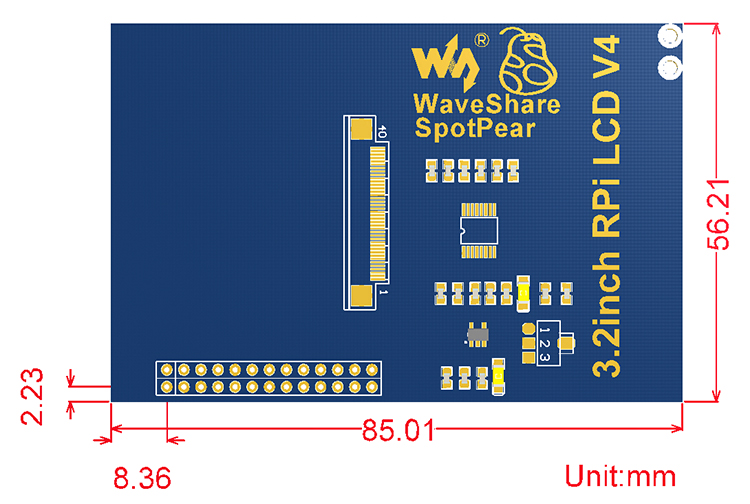
External Dimension
Downloads
Development resources:Image, schematic, dimension, software, etc.
Download: www.waveshare.com/wiki/3.2inch_RPi_LCD_(B)
FAQ
- Why the LCD doesn’t work with my Raspbian?
- To use the LCD with the Raspberry Pi official image, driver should be installed first. Please refer to the user manual.
However, for the first testing, you may want to use our provided image directly. - Why the LCD still doesn’t work with the Waveshare provided image?
- Make sure the hardware connection is correct and connects fine.
Make sure the image in TF card is burnt correctly.
The PWR will keep on and the ACT will keep blinking when the Raspberry Pi starts up successfully, in case both of the two LEDs keep on, it is possible that the image was burnt incorrectly OR the TF card was in bad contact. - Which power supply should I use?
- It is strongly recommended to use a stand-alone 5V/2A power adapter, because the PC’s USB port might have not enough power to support the Pi and LCD.
For more info, please check the wiki page.

Reviews
There are no reviews yet.